How to Actually Use PedalFilter's Search
I spent two hours on a guitar forum last month trying to answer what should have been a simple question: “What’s a good small overdrive that runs on 9V and will fit on a Nano board?” I got fourteen replies. Three of them were helpful. Two were arguments about whether overdrive is even necessary. One was a guy who just wrote “Tube Screamer” with no elaboration, which is the guitar forum equivalent of answering “What should I eat for dinner?” with “food.” Four were recommendations for pedals that don’t run on 9V. And one was someone trying to sell me a Klon clone from their Reverb shop.
This is why I built PedalFilter. Not because the world needed another gear website, but because the existing ways of finding pedals are broken in specific, fixable ways, and I got tired of waiting for someone else to fix them. (The longer version of that story is why we built PedalFilter.)
The Problem with How We Find Pedals
The traditional pedal discovery process goes something like this: you hear a sound you like, you spend an hour trying to figure out what pedal made it, you Google that pedal, you read three reviews that all use the word “transparent” differently, you check the price, you wince, you search for alternatives, you end up on a forum, and forty-five minutes later you’ve added six pedals to your “maybe” list and bought none of them. It’s the Netflix browsing problem applied to guitar gear, and it’s just as soul-crushing.
PedalFilter takes a different approach. Instead of starting with a pedal and working backward to whether it fits your needs, you start with your needs and filter forward to the pedals that match. Sounds obvious. Nobody else does it well.
The Search: Just Start Typing
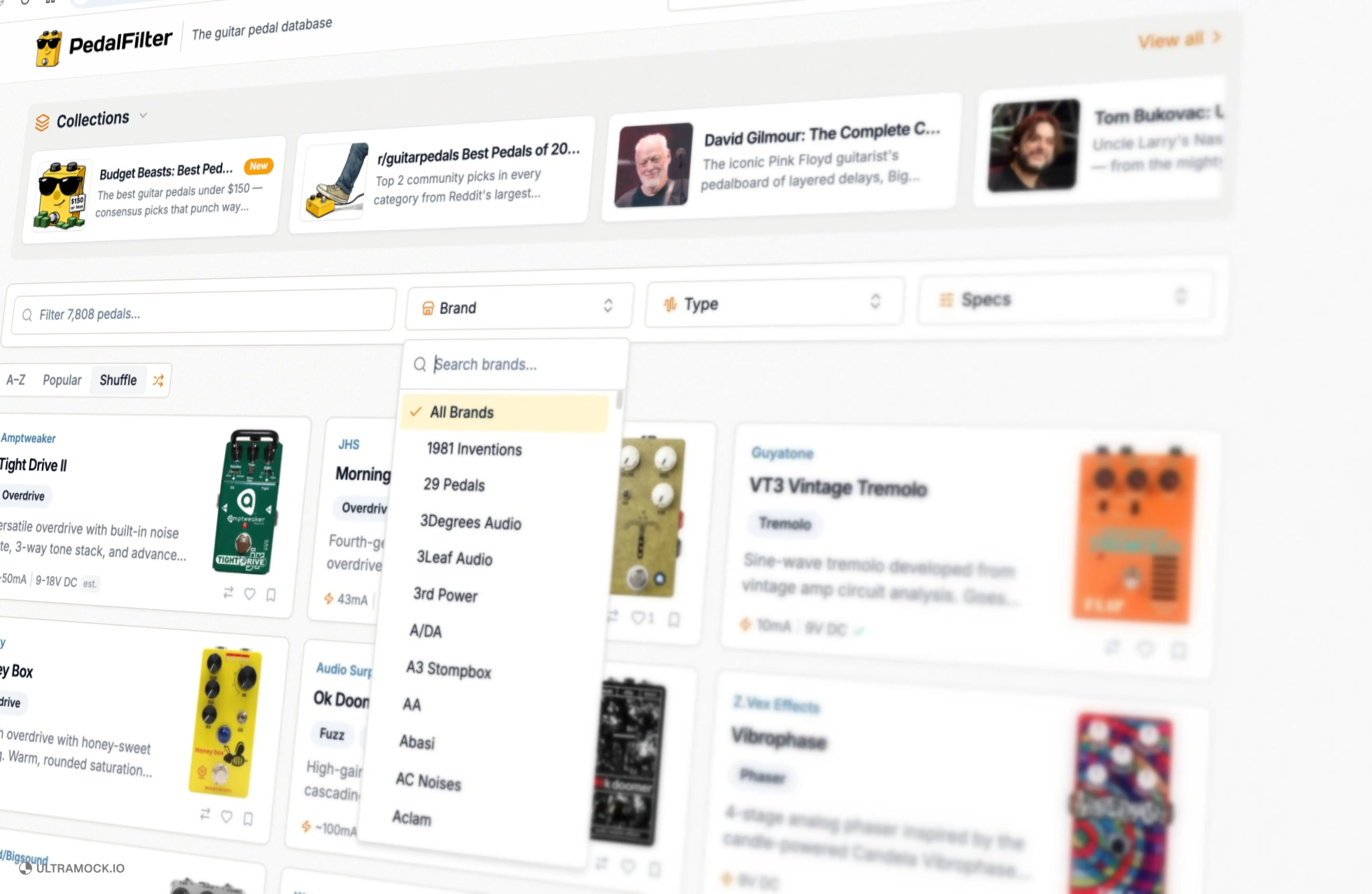
The main pedal grid has a search field at the top, and it’s the fastest way to find anything. Start typing and the grid filters in real time. No page reload, no loading spinner, no “showing results for…” page. You type, and the pedals that don’t match disappear. It’s instant.
Type “king” and you’ll see the Analogman King of Tone show up alongside pedals from Kingtone, a completely different manufacturer. Type “rat” and you’ll get the ProCo RAT plus every RAT-inspired circuit in the database. The search matches against pedal names, manufacturer names, and categories simultaneously, so you don’t have to know the exact name of what you’re looking for. You just have to start typing and the database meets you halfway.
I haven’t seen another pedal site that does this. Most of them give you a search bar that takes you to a results page, like it’s 2004 and you’re using Ask Jeeves. PedalFilter’s search works the way your brain works: you have a vague idea, you start typing it, and the answer appears before you finish the thought.
How the Filters Work (With Real Examples)
Here’s where it gets practical. Say you’re building a small board and you need a delay pedal with tap tempo, and you don’t want to spend more than $200. On a forum, that question generates opinions. On PedalFilter, it generates answers.
Start by selecting Delay from the type filter. That narrows the database from thousands of pedals to just the delay category. Then filter by features to find models with tap tempo. You’ve just eliminated every delay that requires you to twist a knob and guess at the tempo like some kind of rhythmic Neanderthal.
That’s a filtered list of pedals that match exactly what you described. No opinions. No arguments. No guy trying to sell you something from his Reverb shop.
Solving Real Problems
Let me walk through a few scenarios I’ve actually dealt with, because they’re the same ones you’ve dealt with, even if the specific pedals are different.
“I need something that fits on a Nano board.” The dimensions filter is your friend. A Nano+ has about 18 inches of usable width. Filter by pedal size and you’ll see which overdrives, delays, and reverbs will physically fit without playing Tetris with your power supply cables. The Fairfield Circuitry Barbershop fits. The Strymon BigSky does not. This information costs you ten seconds on PedalFilter and thirty minutes on a forum, assuming anyone bothers to answer.
“I want a fuzz but I don’t know what kind.” The type filter breaks fuzz down into a browsable category. Once you’re looking at fuzzes, you can sort by manufacturer to see what each builder offers, compare specs side by side, and read descriptions that tell you what the pedal actually sounds like rather than what marketing department wrote the copy. The Caroline Hawaiian Pizza and the EarthQuaker Acapulco Gold are both in there, and they could not sound more different from each other. The filters help you understand why.


“My power supply only does 9V at 100mA per output.” This is the kind of question that makes forum people glaze over, but it’s one of the most practical things you can filter for on PedalFilter. Power spec filtering lets you search by voltage and current draw, so you know before you buy whether a pedal will work with your existing setup or whether you need to budget for a new power supply. Nothing kills the excitement of a new pedal faster than plugging it in and watching it not turn on.
The Compare Feature
Once you’ve filtered down to a few candidates, the compare feature lets you put them side by side. Not in a “which one is better” way, because that depends on what you need, but in a “here are the actual differences” way. Dimensions, power requirements, controls, price. The stuff that determines whether a pedal works for your specific situation, not whether some stranger on the internet likes it.
I built the compare tool because I was tired of opening six browser tabs, squinting at spec sheets formatted differently on every manufacturer’s website, and trying to remember whether it was the Boss DS-1 or the RAT that drew more current. Now it’s one screen. I use it myself more than I expected to.

What Else You Get
Every pedal detail page is more than a spec sheet. You get recommended pedals based on what you’re looking at, so if you’re checking out a Tube Screamer, you’ll see other overdrives in a similar vein without having to start a new search. You get embedded demo videos where available, so you can hear the thing before you buy it. You get verified specs, dimensions, and power requirements, the kind of data that other sites either get wrong or don’t bother listing at all.
The goal is discoverability. Not just “I know what I want and I need to find it,” but “I don’t know what I want yet and I need something to show me what’s out there.” The filters get you to a shortlist. The recommendations show you what’s adjacent. The specs tell you if it’ll actually work on your board. That’s the whole loop, and it happens faster here than anywhere else.
Getting Started
Go to the search page. Pick a pedal type. Start filtering. It takes about thirty seconds to get a result set that would have taken you an evening of forum browsing, and the results are based on facts rather than feelings. If you find something that doesn’t work right, or a pedal that should be in the database but isn’t, let me know. I’m one person building this thing, and I’d rather hear about a problem than have you silently go back to arguing on Reddit.
The best tool is the one you use. This one’s free, it’s fast, and it won’t try to sell you a Klon clone.